Claude & Gemini Workflow Automation
Agentic Web & Desktop Reporting Workflow
A fully autonomous agentic workflow powered by Anthropic's Computer Use API. It eliminates the error-prone, manual process of pulling monthly advertising performance data across heterogeneous platforms, mapping it directly into enterprise SharePoint reports.
Overview
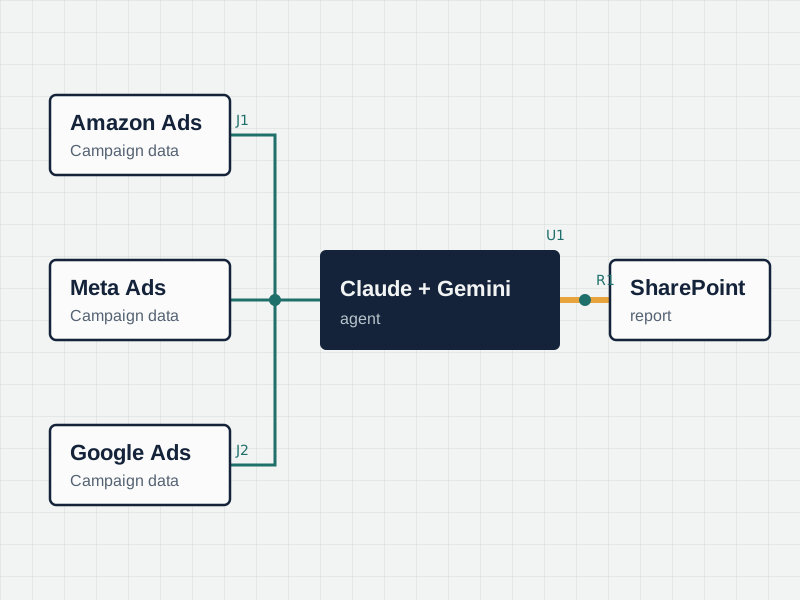
Updating complex Excel reports requires analysts to navigate multiple ad platforms (Amazon, Meta, Google), adjust attribution windows, and carefully inject data into live formulas. Built as a Claude and Gemini workflow on Anthropic's official Computer Use architecture, this agent automates the entire sequence—visually navigating UIs, fetching data, updating the workbook in-place, and drafting executive commentary.
Architecture: The Agent Loop
Our implementation follows Anthropic's official reference architecture for the Computer Use tool. It utilizes an iterative "Agent Loop" where the model receives visual context, decides on an action, and our system executes that mouse or keyboard command in a secure, sandboxed environment.
Claude API
Analyzes screenshots and requests tool actions (e.g., left_click, type).
Tool Execution
Translates tool requests into physical OS-level mouse and keyboard actions.
Sandboxed UI
Virtual display running Chrome, Excel, and local applications.
Key Capabilities
Multi-Platform Aggregation
Automatically pulls performance data across Amazon Ads, Meta Marketing, Google Ads, and Shopify Admin APIs.
Intelligent Data Mapping
Handles differing attribution models and standardizes calendar boundaries without manual intervention.
Computer Use API Integration
Leverages the official Anthropic Computer Use tool (computer_20251124) to visually navigate interfaces and type directly into spreadsheets.
Seamless SharePoint Integration
Updates existing Excel workbooks in-place, adding new month columns without overwriting historical records.
Automated QA & Validation
Spot-checks totals against source data and validates cell formulas to ensure 100% reporting accuracy.
Smart Notifications
Drafts automated Outlook notifications summarizing Month-over-Month (MoM) and Year-over-Year (YoY) performance.
Reduced Key-Person Dependency
Removes the risk of delayed reports by running entirely autonomously on a scheduled trigger.
Challenge and Approach
The Challenge
Manual reporting processes suffer from single-person dependencies, attribution drift, and silent formula errors. Adding a new month column in complex Excel files often leads to broken references, misplaced pastes, and inaccurate Year-over-Year (YoY) metrics.
Our Approach
We designed a robust agentic workflow that connects directly to the underlying APIs. The system intelligently handles rate limits, respects locked attribution windows, and safely modifies SharePoint documents. It includes a built-in validation engine to ensure totals match before drafting a review notification.
The Outcome
Reporting time was reduced to zero. Formula errors and attribution drift were completely eliminated, providing leadership with 100% accurate, timely data on the first business day of every month.